
By Steve Burr l Metropolis Corp
A Cisco Unified Contact Center Enterprise (UCCE) migration can seem like a deceptively simple procedure with a drag-and-drop cloud IVR, polished web dashboards, a browser-based agent desktop, and a swift reduction in data center footprint. But ask the Lead UC Engineer sitting in the maintenance window at 2:00 AM how it's going, and you get the real story.
UCCE is a complex enterprise routing engine built on decades of multi-leg call logic, deeply embedded custom database schemas, peripheral gateway devices, CVP micro-applications, and Expanded Call Context (ECC) variables that pass critical payload data across complex enterprise networks.
Treating this initiative as a surface-level dashboard exercise guarantees failure. Below is a detailed breakdown of the technical realities, hidden dependencies, and structural gaps you must address to achieve true operational parity.
The single biggest operational shock for engineering teams during a UCCE migration planning phase is the fundamental collapse of the underlying data model.
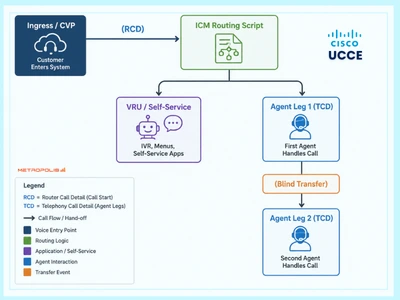
In UCCE, call tracking is granular, relational, and explicit:
Route Call Detail (RCD): Documents the initial routing request, entry point, and early routing intent.
Termination Call Detail (TCD): Captures downstream call handling, VRU legs, agent legs, consults, transfers, and terminations.
The Relational Glue: RouterCallKey + RouterCallKeyDay (supplemented by RouterCallKeySequenceNumber and PeripheralCallKey).
This relational model allows engineers to trace a single interaction across multiple legs, peripherals, scripts, and endpoints. A single RCD entry routinely produces three, four, or five distinct TCD records.
Modern CCaaS platforms prefer a unified, flattened data model. They package an interaction into a single Interaction ID, Conversation ID, or Task ID, breaking it down internally into segments or participant legs.
While this structure simplifies basic queries, it introduces significant friction when establishing UCCE reporting parity. Integrating dedicated cloud & hybrid UC analytics helps bridge these schema discrepancies by normalizing call-leg data across legacy on-premises and modern CCaaS platforms.:
Transfer Logic: UCCE creates separate TCDs for transfers, allowing you to measure exact queue time, agent handle time, and disposition for each leg. Cloud platforms often aggregate these legs or handle consult transfers as secondary sub-segments. If executive compensation or operational KPIs depend on UCCE leg definitions, reported metrics will shift overnight—even if real-world call behavior remains unchanged.
Interval Snapshots & Time-Zone Mechanics: UCCE Half-Hour (HH) and Fifteen-Minute (15M) database tables use specific interval boundary rules based on when a call ended or when an event occurred. Cloud platforms frequently bucket analytics based on event arrival timestamps in UTC, breaking side-by-side historical comparisons.
Engineering teams should not sign off on vendor assertions of "reporting parity" without populating a complete UCCE field mapping crosswalk at the database schema level:
| UCCE Source Field / Object | Operational & Technical Purpose | Target Platform Field Equivalent | Engineering Parity Risk |
|---|---|---|---|
RouterCallKey + RouterCallKeyDay |
Unique composite identity for the routing instance across the enterprise. | Interaction ID / Conversation ID + Migration Correlation ID | Cloud IDs can change upon external transfer or carrier re-route, severing cradle-to-grave tracing. |
RCD (Route Call Detail) |
Logs entry point, routing request, and pre-queue evaluation logic. | Inbound Flow Start Event / Session Start Payload | Cloud platforms rarely log pre-queue route failure details with equivalent database granularity. |
TCD (Termination Call Detail) |
Captures discrete handling legs (VRU, Agent, Consult, Outbound). | Conversation Segments / Participant Handling Legs | CCaaS vendors often flatten legs, obscuring mid-call transfer context or double-counting queue duration. |
FinalObjectID / ScriptID |
Identifies the specific script node or target object where routing concluded. | Flow Version ID + Flow Termination Reason | Harder to isolate whether a call failed at a third-party API lookup node versus a queue node. |
PeripheralCallKey |
Correlates the call at the peripheral/PG layer (e.g., Avaya/Cisco CallManager). | Media Session ID / SIP Call-ID | Difficult to match SIP-level PCAP traces to CCaaS application logs during carrier escalation. |
ECC Variables (user.*) |
Custom key-value pairs carrying payload, auth state, and business intent. | Custom Attributes / Participant Data / Context Variables | Payload size limits, character sanitization, and loss of persistence across blind transfers. |
If RCD and TCD form the core framework of UCCE, ECC variables represent the data payload running through it.
In enterprise deployments, UCCE does not route calls strictly by dialed numbers. CVP performs database dips, fetches CRM records, processes voice-bot outcomes, validates account numbers, and writes these values into ECC variables (user.AccountTier, user.AuthStatus, user.LanguagePref). These variables drive ICM routing decisions, dictate Finesse agent screen pops, and pass critical context to downstream platforms.
user.CustomerTier = VIP & user.Auth = Passed |When migrating to a CCaaS environment, project teams often replicate basic flow diagrams while overlooking the variable persistence layer:
Truncation and Type Casting: UCCE supports custom string lengths and array structures in ECC space. Many cloud APIs enforce strict limits on custom attributes (e.g., 256 or 1024 characters) or sanitize special characters within stringified JSON payloads.
The Transfer Black Hole: When an agent performs a warm transfer to an external third-party vendor or an unmanaged SIP trunk, UCCE uses SIP headers or Cisco UUI (User-to-User Information) fields to pass ECC arrays across the enterprise. CCaaS platforms frequently strip custom participant data upon external SIP transfer unless custom SIP header passing (X-Attributes) is explicitly configured on the Session Border Controller (SBC) layer.
Downstream Context Loss: Compliance recording systems (NICE, Verint, Calabrio) rely on ECC variables injected via JTAPI/CTIServer events to tag call recordings with Account Numbers or PCI flags. If the target cloud platform fails to map those attributes into its CTI export feed, historical recordings become unsearchable, creating immediate regulatory risk.
A simple queue-and-agent CSV export does not constitute a complete system discovery. The most common engineering mistake is assuming UCCE infrastructure begins at the SIP trunk and ends at the Finesse agent desktop.
A thorough discovery audit must map every hidden architectural dependency before building target routing flows.
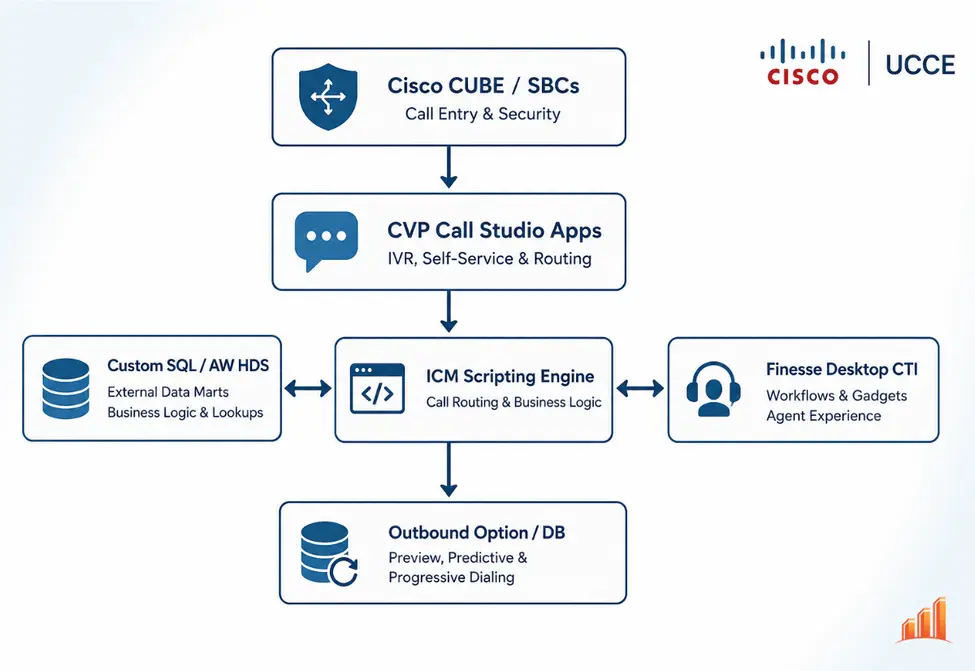
The Risk: Treating CVP as a basic prompt-and-collect IVR.
The Reality: CVP applications execute local Java code, SOAP/REST integrations, custom error-handling loops, and VXML subdialogs. If a back-end CRM API times out in CVP, the system relies on specific fallback paths. Replicating simple routing in a cloud flow builder is straightforward; replicating CVP's exception and error-handling logic requires full flow decomposition.
The Risk: Assuming modern cloud agent desktops will natively host legacy Finesse gadgets.
The Reality: Finesse gadgets use JavaScript APIs tied directly to Cisco CTI events (User - Open-Options, Dialog - Answered). If agents rely on embedded gadgets for physical phone control, CRM screen pops, or custom wrap-up timers, those applications must be re-engineered against the target platform's CTI/SDK layer.
The Risk: Assuming CUIC is the sole repository for reporting data.
The Reality: Enterprise BI teams frequently bypass out-of-the-box CUIC reports, using scheduled SQL scripts, ETL pipelines, and direct queries against the UCCE Historical Data Server (HDS) or Access Admin Workstation (AW) database schemas (Call_Type_Interval, Agent_Interval).
Decommissioning the HDS database without establishing a target data warehouse strategy will immediately break downstream business dashboards. Deploying a dedicated Power BI connector for UC data allows business intelligence teams to preserve historical trends alongside new CCaaS datasets.
The Risk: Viewing outbound dialing strictly as a list of target phone numbers.
The Reality: UCCE Outbound Option uses specialized database tables (Dialer_Detail, RequeryLogic) to manage predictive dialing algorithms, Answering Machine Detection (AMD), callback scheduling, and TCPA compliance throttling. Cloud dialers utilize different pacing algorithms and disposition codes, requiring campaign retry logic and regulatory safeguards to be rebuilt from the ground up.
Transitioning to major CCaaS destinations presents specific architectural friction points when replacing legacy UCCE components.
Moving from Cisco UCCE to Webex Contact Center represents a common strategic path for organizations remaining within the Cisco ecosystem, but it is not an automatic schema upgrade.
Key Architectural Consideration: Webex Contact Center is a multi-tenant cloud platform built on a distinct data architecture. Finesse desktop layouts do not automatically import into the Webex Contact Center Agent Desktop; custom CTI code, workflow automation rules, and agent state mappings must be reconstructed.
Data Model Mapping: Webex reporting relies on Control Hub and Analyzer schemas. Legacy identifier fields like RouterCallKey or CallTypeID do not exist natively in Analyzer exports—you must explicitly configure Custom Flow Variables during flow design to persist correlation keys for cross-platform auditing.
Executing a transition from UCCE to Genesys Cloud requires translating ICM node-based script logic into Genesys Architect flows and Data Actions.
Key Architectural Consideration: Precision Routing vs. Bullseye Routing. UCCE Precision Queues evaluate agent attributes dynamically using logical expressions (Language == English AND Skill > 8). Genesys uses Bullseye Routing or Attribute-Based Routing, which handles expansion intervals differently. Engineering teams must audit Precision Queue definitions and adjust expansion rings to reflect real-world agent capacity, preventing unintended queue bottlenecks.
Media Path Verification: During pilot phases, capture full protocol traces (SIP/RTP) at the Edge/BYOC layer to identify early-media, DTMF, or codec mismatch issues before cutting over production traffic.
Migrating from UCCE to NICE CXone involves aligning CUBE/SBC infrastructure, studio routing scripts, and external recording integrations.
Key Architectural Consideration: Studio Scripting & Scope Rules. CXone utilizes "Studio" scripts for routing logic. In Studio, variables must be explicitly managed within proper scope boundaries (GLOBAL, STATE, LOCAL) to prevent data loss during complex routing loops.
Handling RONA Events: Mapping UCCE's RONA (Redirect on No Answer) to CXone's Refusal/Timeout logic requires custom scripting. This ensures agents who fail to answer are set to an unavailable state immediately, preventing calls from looping continuously back to the same unresponsive endpoint.
A critical, often delayed element of project execution is establishing a clear strategy for UCCE historical data migration.
Enterprise contact centers are bound by regulatory requirements (such as FINRA, HIPAA, or PCI-DSS) that mandate multi-year retention of detailed interaction records, agent state traces, and audit logs. Attempting to convert raw UCCE database tables (Termination_Call_Detail, Route_Call_Detail, Agent_State_Trace) directly into a target cloud vendor's native analytics schema is impractical due to fundamental differences in data models.
Extract and Retain Raw Schema: Prior to decommissioning the UCCE environment, execute full database dumps of the HDS/AW instance. Preserve raw TCD, RCD, Agent_Interval, and Dialer_Detail tables in an accessible offline enterprise data lake or SQL warehouse.
Build a Universal Query Layer: Instead of forcing historical UCCE data into the cloud vendor's reporting tool, expose the preserved UCCE tables alongside the new platform’s API/event data via a unified Business Intelligence layer (e.g., Snowflake, PowerBI, or Tableau).
Cross-Platform Correlation Identifiers: Map legacy RouterCallKey and RouterCallKeyDay fields to a designated custom field in the target platform during coexistence. This maintains audit trail continuity when historical calls are referenced alongside new interactions.
Following cutover, operational issues require immediate technical isolation. Engineering teams can reference this diagnostic matrix to categorize post-migration tickets effectively:
| Reported Symptom | Primary Suspected Component | Underlying Engineering Cause | Diagnostic & Remediation Steps |
|---|---|---|---|
| "RONA / Missed Call rates increased significantly post-cutover." | Network / Endpoint / Softphone | Timing mismatch between SIP INVITE delivery, WebRTC signaling, and agent desktop answer acknowledgment. |
1. Compare SBC SIP log timestamps against cloud CTI event logs. 2. Check local OS audio drivers and browser auto-play policies affecting WebRTC alerting. 3. Adjust target platform ring-timer thresholds to account for network latency. |
| "Call volume increased by 30%, but completed contacts remain flat." | Reporting / Data Model | Multi-leg transfer calls or consult legs are being processed as new standalone interactions in the target analytics engine. | 1. Audit target metric definitions (e.g., "Contacts" vs. "Conversations"). 2. Exclude internal consult legs, warm transfer segments, and short-abandon VRU legs from top-level volume reports. |
| "Agents receive screen pops lacking customer payload context." | ECC / Data Action Integration | CVP/IVR API lookups are timing out, or custom attributes are failing to persist across transfer legs. | 1. Inspect target IVR execution logs for API timeout caps (e.g., hard 2000ms limits). 2. Verify custom context attributes are mapped for persistence across transfers within the flow builder. |
| "Historical reports show discrepancies against new platform dashboards." | Interval / Time-Zone Boundaries | Discrepancy between UCCE "Call End" interval aggregation rules and CCaaS "Event Arrival" or UTC boundary definitions. | 1. Standardize time zone and interval boundary rules across both legacy and new reporting environments. 2. Query raw event-level extracts rather than pre-aggregated summary views. |
| "External transfers drop immediately upon transfer execution." | SBC / SIP Signaling | SIP UUI header stripping, DTMF mode mismatch (RFC 2833 vs. In-band), or codec negotiation failure (G.711 vs. G.729). | 1. Capture full PCAP traces on the perimeter SBC/CUBE. 2. Ensure X-Attributes or custom SIP headers pass across external trunks.3. Confirm gateway DSP transcoding resources are properly allocated. |
To manage risk effectively, avoid a single-night "big bang" cutover. Staging the transition by business unit, entry point, or call type provides a structured validation path.
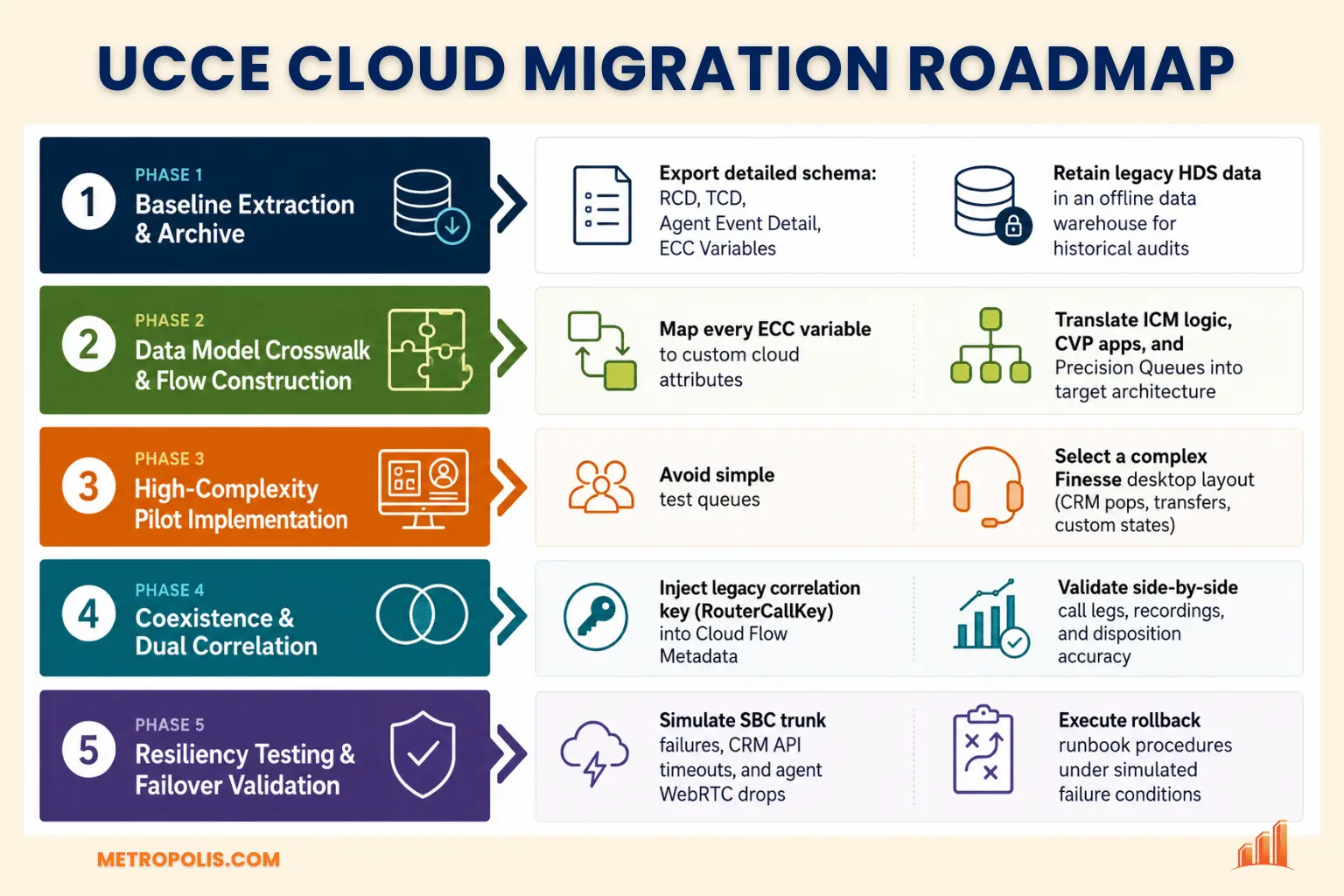
Prior to modifying production routing, extract a minimum of 90 days of raw RCD, TCD, Agent_State_Trace, and Dialer_Detail records directly from the UCCE HDS/AW instance into a dedicated staging repository. This data serves as an empirical baseline for validating operational performance post-cutover.
Map all ECC variables, call variables, and CVP result codes to equivalent fields in the new platform. Custom interaction attributes should be fully provisioned before constructing production routing flows.
Avoid using simple test queues (such as internal IT helpdesks) for pilot validation. Simple queues do not test complex routing conditions. Select a high-complexity business unit—one that leverages CVP data dips, warm transfers, custom CTI integration, CRM screen pops, and strict disposition logging. Successfully migrating a complex queue validates the broader migration blueprint.
During phased cutovers, interactions will cross both platforms. Maintain end-to-end visibility by passing the UCCE RouterCallKey or a unique Migration Correlation ID into the cloud platform's flow variables at ingress. This enables data teams to join legacy UCCE database logs with new cloud event streams using a common identifier.
Validate platform behavior under simulated failure conditions prior to production cutover:
CRM API Delays: Verify flow behavior when a CRM lookup experiences latent responses (e.g., 5-second delays). Ensure the system degrades to an appropriate fallback queue rather than dropping the call.
SIP / Carrier Gateway Failure: Test perimeter SBC failover to ensure secondary media paths activate without dropping active calls.
Agent WebRTC Session Loss: Simulate network disruptions at the agent desktop to confirm the target platform correctly categorizes the event as a network disconnect rather than an agent-initiated drop.
A successful UCCE migration requires looking beyond interface changes to focus on data integrity, context preservation, and system architecture.
The ultimate measure of cutover success is operational continuity: revenue-generating calls reach the intended endpoints, business context remains intact across every leg, and engineering teams retain the field-level visibility necessary to explain and trace every interaction. By maintaining rigorous field mapping, auditing underlying dependencies, and establishing data preservation strategies from the outset, engineering teams can navigate the transition cleanly while safeguarding critical enterprise data.
Ensure total telemetry retention, field mapping parity, and multi-vendor analytics continuity with Metropolis.
Explore our Call Center Analytics Software


