Unraveling Cisco Hunt Group Routing Logic using CDR
When calls go astray or reports indicate routing inefficiencies, a deep dive into Cisco Call Detail Records (CDRs) becomes essential. Cisco Hunt Groups allow incoming calls to be distributed across multiple destinations using sequential, circular, or broadcast logic.

To effectively trace a call, engineers must understand that CUCM produces a granular, chronological log where each routing attempt is represented by a separate call leg. This guide explains how to reconstruct these call paths to optimize performance and troubleshoot routing anomalies.
The Anatomy of Hunt Group CDR Rows
Each attempt to deliver a call to a hunt group member is recorded as a separate call leg. CUCM generates a new CDR row whenever it tries a different destination. A single inbound call to a hunt pilot may create:
- One CDR row for the initial hunt pilot entry.
- One or more CDR rows for individual hunt members (agents).
- A final row for termination (voicemail, hang-up, or failure).
Identifying Key Players and Numbers
To reconstruct the journey, you must isolate specific fields that act as breadcrumbs:
callingPartyNumber: The originator of the call.originalCalledPartyNumber: The very first number dialed (e.g., the Main Hunt Pilot DN).finalCalledPartyNumber: Where the call ultimately connected or was last presented.pkid: A unique UUID for each specific CDR record/leg.globalCallID_callId: The critical identifier used to "stitch" multiple rows into a single interaction.
Hunt Pilot vs. Member Detection
If originalCalledPartyNumber matches the hunt pilot DN, the call entered the hunt group. When CUCM attempts delivery to a member, the finalCalledPartyNumber changes to that specific member’s directory number.
Tracking the Hops: Redirection Logic
As a call moves through a Hunt Group (e.g., from pilot to member 1, then member 2 due to no answer), the redirection fields update to show the sequence.
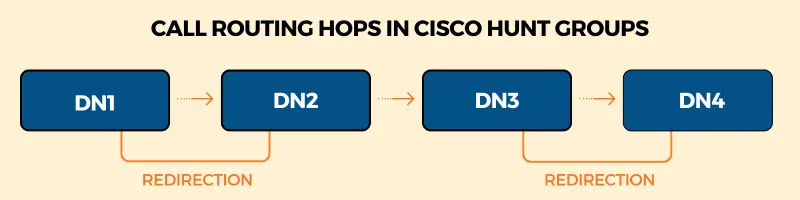
lastRedirectDn: Indicates the DN of the entity that performed the last redirection. This reveals the sequence of members involved.origCalledPartyRedirectOnBehalfOf: Specifies the feature (e.g., Hunt Group algorithm) that caused the redirection.lastRedirectRedirectReason: Explains why the hop occurred (e.g., No Answer, Busy, or Unconditional Forwarding).
Using Cause Codes to Understand Outcomes
Each hunt attempt ends with a destCause_value that explains why CUCM moved to the next member or stopped:
- Cause 16 (Normal Clearing) → Member answered or caller hung up normally.
- Cause 17 (User Busy) → Member was unavailable/busy.
- Cause 18 (No User Responding) → The call timed out (No Answer).
Detailed explanation of Cisco CDR cause codes →
Leveraging CDRs for Performance Metrics
While CUCM CDRs don't provide a "Time in Queue" field for hunt groups, you can infer these KPIs through manual analysis:
Estimating Wait Time
By examining the dateTimeOrigination (start of leg) and dateTimeConnect (connection time) for sequential redirected legs, you can calculate the total duration a caller spent ringing different members before being answered.
Identifying Abandoned Calls
An abandoned call occurs when a caller hangs up while the call is being presented. Look for a destCause_value indicating the originator terminated the call before dateTimeConnect has a value.
Hunt Groups vs. Queues: The Distinction
It is critical to remember that Hunt Groups are not full contact center queues (like UCCX):
- No persistent queue state: There is no native wait-time tracking.
- Routing vs. Experience: CDRs record routing attempts, not the caller's experience or "hold" time in a traditional sense.
The Troubleshooting Process
- Isolate: Find all CDRs using the
globalCallID_callId. - Trace: Start with the
originalCalledPartyNumberto confirm entry. - Follow: Map the chain of
lastRedirectDnentries to see the member sequence. - Analyze: Check
RedirectReasonat each hop to find why members were skipped. - Verify Partitions: Ensure
lastRedirectDnPartitionandfinalCalledPartyNumberPartitionare correctly configured, as incorrect partitions often cause "ghost" failures.
Learn how to stitch multiple transfer calls in Cisco CDRs →
Automating the Analysis
Manually "stitching" globalCallID_callId rows is labor-intensive.
Expo XT visualizes these call flows automatically, highlighting abandoned calls and identifying inefficient routing patterns across your entire CUCM cluster.