
Before diving into specific limitations, it's essential to understand how Webex Contact Center's reporting infrastructure actually works. This technical foundation explains why certain constraints exist and helps administrators make informed decisions about their analytics strategy.
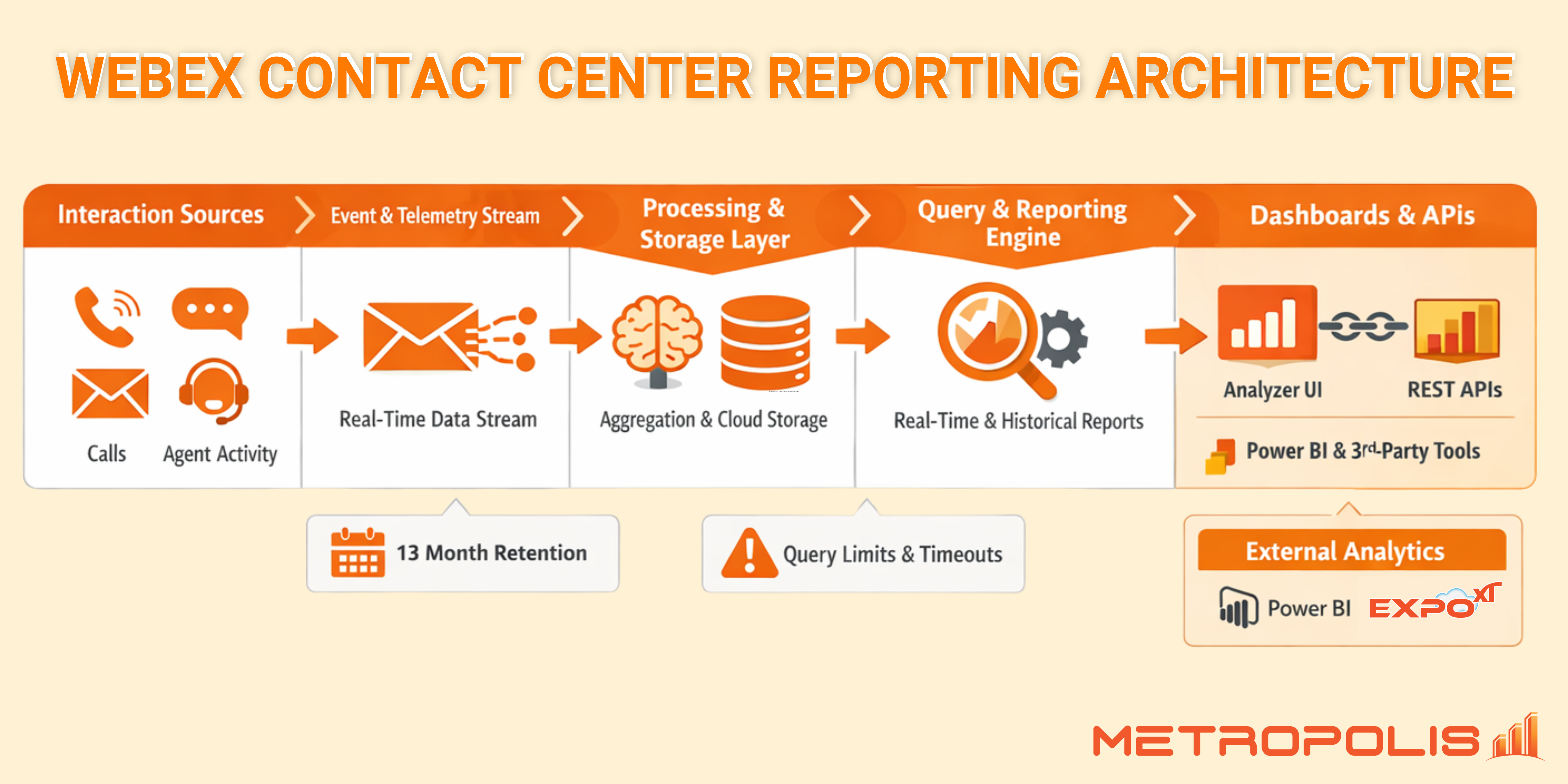
At the core of WxCC's reporting capabilities sits the Cisco Analyzer—a cloud-based analytics engine that collects, processes, and presents contact center data. Unlike traditional on-premise solutions where you control the database directly, WxCC operates as a managed service where Cisco handles the underlying data infrastructure.
The reporting architecture follows a multi-stage pipeline:
Telephony Events: Every customer interaction generates real-time event data—calls arriving, agents answering, customers waiting in queue, transfers occurring, and calls completing.
Event Processing: Raw telephony events flow into processing engines that aggregate, correlate, and normalize the data.
Data Storage: Processed records are stored in Cisco's managed cloud database infrastructure.
Analyzer Query Engine: When you run a report, the Analyzer queries the stored data and applies your filters.
API Layer: For programmatic access, WxCC exposes REST APIs for external system retrieval.
The Analyzer interface provides two primary modes that operate differently under the hood:
| Mode | Technical Operation |
|---|---|
| Real-Time Mode | Connects directly to live event streams; data is ephemeral and not stored. |
| Historical Mode | Queries the stored database for completed interactions. |
Several architectural decisions create reporting gaps that administrators frequently encounter:
WxCC stores detailed call detail records (CDRs) for 13 months. However, the UI implements further restrictions:
Pre-built reports default to 30-day rolling windows.
Performance degrades significantly for queries spanning multiple months.
Granular detail becomes harder to extract as data ages.
Because the Analyzer is a multi-tenant environment, Cisco implements safeguards:
Query timeouts: Complex reports may fail if they take too long.
Concurrency restrictions: Multiple users running reports can slow the system.
Row limits: Very large result sets may be truncated.
For organizations needing capabilities beyond the UI, Cisco provides programmatic access through REST APIs.
Historical Reporting: GET /v1/tasks - Provides access to completed interaction records.
Real-Time Statistics: GET /v1/queues/{id}/statistics - Returns current state snapshots.
All WxCC API access requires OAuth 2.0 authentication. Throttling is applied to prevent abuse:
Standard tier: ~100 requests per minute.
Burst allowance: ~500 requests in short intervals.
Historical data beyond 13 months.
Real-time event streaming (no WebSockets).
Pre-aggregated trend data (must be calculated manually).
Cross-platform correlation with Teams or other PBX data.
These architectural realities create practical challenges for various departments:
Compliance: Industries with long-term mandates cannot rely solely on WxCC's 13-month window.
Strategic Planning: Year-over-year comparisons for budgeting require external storage.
Troubleshooting: Technical teams may lack network-level metrics (jitter/latency) in standard reports.
Looking to overcome these limitations? Check out Expo XT for Webex Contact Center for advanced analytics and long-term retention.
Understanding the distinction between operational monitoring and long-term business intelligence is key. While WxCC excels at the former, the latter often requires an external analytics layer or third-party integration to bridge the architectural gaps.