
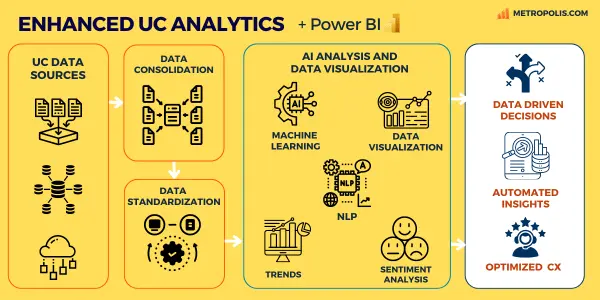
Power BI is a powerful tool for building dashboards—but using it for unified communications (UC) data is significantly more complex than most teams expect.
Unified Communications (UC) data in Power BI typically includes call detail records (CDR), call quality metrics, queue performance, and user activity across platforms like Cisco UCM, Webex Calling, and Zoom Phone. These platforms generate large volumes of call data, but that data is not structured natively for direct analysis in Power BI.
Accessing and normalizing UC data in order for Power BI to centralize and visualize this data requires handling APIs, flat files, and inconsistent schemas across platforms. This guide explains how to build Power BI dashboards for UC data, including how integration works, why it is challenging, and how to decide between building your own solution or using a pre-built data connector.
Power BI cannot typically ingest UC data in its raw state. To reach a "report-ready" status, data must progress through a five-stage lifecycle:
Extraction: Pulling CDRs (Call Detail Records) via APIs, SFTP, or SQL exports.
Transformation: Normalizing disparate schemas into a consistent format.
Loading: Ingesting the cleaned data into the Power BI service.
Semantic Modeling: Establishing relationships between facts and dimensions.
Visualization: Creating the final interactive dashboards.
Each step introduces complexity, especially as data volume and system diversity increase.
Communications platforms produce data that differs significantly from traditional business systems. Unlike structured ERP or CRM datasets, telecom data often contains complex elements such as multi-leg call records, event-driven state changes, and timestamp-heavy datasets. Furthermore, platform-specific schemas and extremely high data volumes add layers of difficulty.
Key Challenges for Power BI Practitioners:
Data Is Not Analytics-Ready: CUCM, Webex, and other platforms output raw data designed for logging—not reporting. Fields must be decoded, mapped, and interpreted.
Multiple Data Sources: UC environments often span multiple systems, each with different schemas and formats.
Data Normalization: Combining data across platforms requires standardizing fields, formats, and definitions.
Multi-Leg Call Complexity: A single call may generate multiple records, requiring stitching logic to reconstruct the full interaction.
High Data Volume: Large enterprises generate millions of records, which can impact Power BI performance and refresh times.
To ensure performance and scalability, UC data should follow a Star Schema design, separating quantitative "Facts" from descriptive "Dimensions".
Fact Tables (The 'What'):
Dimension Tables (The "Who/Where")
Time-Series Alignment: Telecommunications data is extremely sensitive to timestamps. Accurate modeling must account for time zone conversions, daylight savings, and calculating durations between state changes.
Once the model is built, organizations typically focus on these core reporting areas:
Operational Healthy: Call volume trends and failure analysis via cause codes.
Efficiency Metrics: Average handle time (AHT) and queue occupancy
User Adoption: Insights into how and where collaboration tools are being utilized across the enterprise.
Designing effective dashboards requires careful attention to layout, hierarchy, and clarity. Our Power BI dashboard design best practices playbook explains how to structure reports using IBCS-aligned visualization standards.
Organizations have three options when using Power BI for unified communications data: build everything internally, use a data connector, or adopt a full analytics platform.
While building your own solution offers flexibility, many teams underestimate the complexity of working with UC data—and often shift approaches after initial implementation challenges.
A UC to Power BI connector like Metropolis MetroLink handles the "heavy lifting" of data preparation—cleaning, normalizing, and structuring the data—before it hits Power BI.
This allows analysts to focus on building customized reports rather than managing data pipelines. This approach is ideal for organizations that want to standardize their data layer while continuing to integrate UC into their existing proprietary dashboards in Power BI.
For organizations requiring immediate ROI without development overhead. Platforms like Expo XT UC Analytics provide pre-built, turnkey dashboards and AI-driven insights out of the box, consolidating data from all UC platforms into a single pane of glass.
This approach is best suited for teams that prioritize speed, simplicity, and immediate visibility over custom dashboard development.

Yes. Power BI can analyze call detail record data once the dataset has been properly prepared and modeled. CDR datasets typically include call start/end times, caller identifiers, routing paths, and trunk usage. However, raw CDR exports often require normalization because a single phone call may generate multiple records representing call legs or transfers. Preprocessing is essential to consolidate these into a structured format.
What is the best data model for telecom or contact center analytics in Power BI?Most Power BI implementations use a star schema semantic model. This involves separating high-volume Fact tables (call events, agent states) from descriptive Dimension tables (agent names, queue locations, time periods). This structure improves query performance and makes it easier to build reusable analytics measures.
Can Power BI handle large telecom datasets?Yes, but performance planning is critical as enterprise systems generate millions of records daily. Strategies like incremental refresh, aggregation tables, and partitioned datasets allow Power BI to maintain interactive performance even with massive data volumes.
What is the Power BI XMLA endpoint and why does it matter?The XMLA endpoint allows external tools to interact with Power BI semantic models programmatically. This is vital for enterprise environments to automate deployment, manage security settings, and use advanced tools like Tabular Editor for deeper control over the analytics lifecycle.
Can Power BI combine multiple communications platforms?Absolutely. Power BI is designed to combine data from disparate sources like phone systems, contact center platforms, and collaboration tools (Teams, Zoom, etc.). As long as the data is normalized, it allows for a "single pane of glass" view of the entire communication landscape.
