
Call reporting is the process of collecting, organizing, and reviewing information about telephone calls made to and from a business. Call reports can show details such as when a call occurred, how long it lasted, where it originated, where it was routed, and whether it was answered or completed.
Call reporting is commonly based on Call Detail Records (CDRs) generated by a business phone system, unified communications platform, or contact center. These records provide the underlying data used to create call logs, summaries, historical reports, and other views of telephone activity.
The information available depends on the phone system and the call data it produces. A call record may contain information such as:
Date and time — when the call started or ended
Call duration — how long the call lasted
Calling number — the number or endpoint that originated the call
Called number — the number or endpoint that received the call
Direction — inbound, outbound, or internal
Extension or user — the phone, extension, or user associated with the call
Call disposition — information about how the call ended
Trunk or route — the network path or trunk used by the call
Location or department — where the call originated or was handled, when that information is available
Not every phone system provides the same fields. Cloud and on-premises communications platforms can generate different types of call records, and the available information can also depend on how the system is configured.
A Call Detail Record (CDR) is a record of a telephone call generated by a communications system.
CDRs provide the raw information from which many call reports are created. A single CDR can contain information about the participants, timing, duration, direction, routing, and disposition of a call.
For example, a CDR might show that an external number called a company's main number at 10:14 AM, the call was routed to an extension, and the call lasted six minutes.
A collection of CDRs provides a historical record of telephone activity that can be searched, grouped, summarized, and reported on.
The exact fields and terminology vary between communications platforms.
Call reporting generally follows four basic steps.
Call data is generated: When a call takes place, the phone system or communications platform records information about that call.
Call records are collected: The records are made available to the reporting system. Depending on the platform, this may occur through CDR files, databases, APIs, logs, or other data sources.
The records are organized: Call records can be grouped by characteristics such as date, time, extension, department, location, call direction, destination, or call type.
Reports are generated: The organized data can be presented as call logs, summaries, charts, tables, or historical reports.
This allows large numbers of individual call records to be reviewed as meaningful patterns rather than as isolated events.
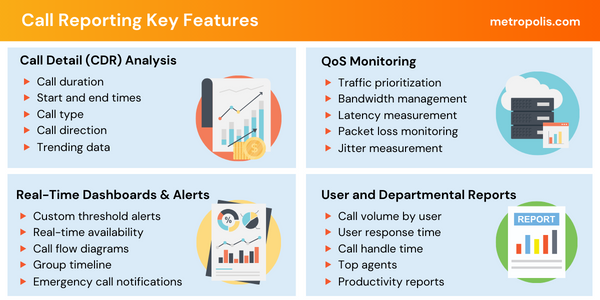
Call reporting makes it possible to examine telephone activity over specific or extended periods without sifting through individual call records one at a time. Here is a breakdown of what call reports reveal:
Track hourly, daily, weekly, or monthly call counts to uncover historical trends and recurring activity changes over time.
Compare internal calling activity against external incoming and outgoing communications.
Analyze call lengths and see how durations vary across specific users, departments, locations, or call types.
Identify incomplete or unreturned calls when captured by the underlying call record data.
See how calling workloads are distributed across individual extensions, users, departments, sites, or contact center queues/agents.
Evaluate network conditions such as jitter, latency, packet loss, audio quality, and overall network performance alongside call logs.
Call reporting can be used with many types of business communications systems, including traditional PBX systems, IP phone systems, unified communications platforms, cloud calling services, and contact center platforms. The terminology and available data vary by platform.
For example, one system may provide detailed CDRs containing trunk, routing, and disposition information, while another may expose call history through an administrative portal or API. This is why call reporting can look different from one communications environment to another even when the basic purpose is the same: turning call activity into information that can be reviewed and reported.

Businesses generate large amounts of telephone activity every day. Without reporting, much of the information contained in those calls remains difficult to review. Call reporting turns individual call records into information that can be searched, grouped, compared, and reviewed over time.
Organizations may use call reporting to:
Review telephone activity by department or location
Investigate individual calls
Monitor changes in call volume
Identify periods of high or low call activity
Review unanswered or missed calls
Understand how telephone resources are being used
Maintain historical records of communications activity
Support telecommunications and unified communications administration
The value of a call report depends on the quality and detail of the underlying call data.
A call log is generally a record or list of individual calls.
A call report organizes call data to make it easier to summarize, filter, group, and review.
For example, a call log might contain hundreds of individual calls. A report could summarize those calls by day, department, extension, direction, or duration.
The terms are sometimes used differently depending on the communications platform, but the basic distinction is between individual call records and a summarized or organized view of those records.
Call reporting is the collection and presentation of information about telephone calls. It can show details such as call time, duration, direction, participants, routing, and disposition, depending on the communications system.
CDR stands for Call Detail Record. It is a record generated by a communications system containing information about a telephone call. CDRs are commonly used as the underlying data for call reports.
A call report may show call volume, duration, date and time, calling and called numbers, direction, extensions, departments, locations, routing information, and call disposition. The available information varies by platform.
Yes, when the underlying communications system records unanswered or missed calls. The level of detail available depends on the platform and its call records.
Yes. Call reporting can organize stored call records into historical reports, allowing organizations to review telephone activity over days, weeks, months, or longer periods when the data is retained.
Yes. Cloud phone systems can provide call records and reporting data, although the type and availability of information varies by platform.
A call log generally presents individual call records, while a call report organizes those records into a summarized or filtered view for easier analysis and review.
If you are looking for a platform to collect call data and generate reports for your own communications environment, explore OfficeWatch Call Reporting Software.
For organizations looking beyond individual call records to broader UC and contact center performance data, explore Expo XT UC & Call Center Analytics Software.
OfficeWatch Call Reporting software helps businesses track calls from their Cisco, Mitel, Avaya, NEC, or other PBX systems for accurate historical and real-time communication trends.
Learn More About OfficeWatch


